|
;)
;)
Intel Core i7 Extreme 965 CPU-Z Details
We fired up the latest version of CPU-Z to give you all a glimpse into the Core i7 platform’s inner workings, with a Core i7 Extreme 965 installed in an Intel X58SO motherboard. In its stock configuration the Core i7 Extreme 965 processor powering the platform is clocked at 3.2GHz (24 x 133MHz, 6.3GT/s QPI link speed) with a 1.16v core voltage. The process technology is correctly identified as 45nm and the processor uses Intel’s new Socket 1366 LGA packaging. The processor cache configuration information and QPI link speed are listed as well.
;)
Intel Core i7 Extreme 965 Processor Overclocked to 4.1GHz
We also did some overclocking to see how much headroom these early Core i7 processors have left untapped under their hoods. Because the Core i7 Extreme 965 has its overspeed protection removed--i.e. its multipliers are unlocked--we overclocked the processor by raising its multiplier to 25 and also experimented with an increased QPI speed. With the core voltage raised to 1.4v and the memory voltage tapped at 1.65v, we were able to take our particular processor up to a stable 4.15GHz with air-cooling.
As you may have heard in the weeks leading up to today's announcement, the Core i7 processor, and in particular its integrated memory controller, are sensitive to increased voltages. Memory voltages higher than 1.65v are not recommended and could damage the CPU. In light of this, memory manufacturers have begun shipping triple-channel DDR3 memory kits capable of relatively high frequencies with voltages no higher than 1.65v.
As you may have heard in the weeks leading up to today's announcement, the Core i7 processor, and in particular its integrated memory controller, are sensitive to increased voltages. Memory voltages higher than 1.65v are not recommended and could damage the CPU. In light of this, memory manufacturers have begun shipping triple-channel DDR3 memory kits capable of relatively high frequencies with voltages no higher than 1.65v.

| Introducing the X58 Express |
As they typically do when launching a line of processors based on a new micro-architecture, Intel will also be releasing the X58 Express chipset to support Core i7 processors. Due to the fact that Core i7 processors have their memory controllers integrated into the CPU die, however, the X58 isn't so much a brand new chipset as it is an adaptation of existing technologies to support the Core i7.  ;) As you can see, the X58 Express chipset consists of the X58 I/O hub and the ICH10 - ICH10R Southbridge, which was first introduced with the P45 chipset for the LGA775 platform. The X58 is equipped with up to 36 lanes of PCI Express 2.0 connectivity, that with flexible lane configurations possible to support multiple graphics cards. The X58 has native support for ATI's CrossFireX technology, and NVIDIA has opened SLI up to the X58 platform as well, but motherboard manufacturers have to submit their boards for evaluation to NVIDIA and in order to enable SLI, the board's BIOS must be outfitted with the necessary hooks. We've got more information regarding SLI support on the X58 available here. As you can see, the X58 Express chipset consists of the X58 I/O hub and the ICH10 - ICH10R Southbridge, which was first introduced with the P45 chipset for the LGA775 platform. The X58 is equipped with up to 36 lanes of PCI Express 2.0 connectivity, that with flexible lane configurations possible to support multiple graphics cards. The X58 has native support for ATI's CrossFireX technology, and NVIDIA has opened SLI up to the X58 platform as well, but motherboard manufacturers have to submit their boards for evaluation to NVIDIA and in order to enable SLI, the board's BIOS must be outfitted with the necessary hooks. We've got more information regarding SLI support on the X58 available here.Notice the three channels of DDR3 memory hang directly off the processor in the diagram above, and that the CPU is linked to the IOH over a QPI link capable of offering up to 25.6GB/s of bandwidth. This kind bandwidth is possible per QPI port because the link is comprised of 40 dedicated data lanes (20 in each direction). The ICH10 Southbridge supports 6 SATA ports, 12 USB 2.0 ports, HD audio, 6 PCI Express x1 lanes and Intel 82567 Gigabit LAN. Many X58 Express based motherboards, however, will feature the ICH10R, which also adds support for Intel Matrix RAID storage technology. Notice, there is no legacy PATA or LPT support here. |
| Core i7 Motherboards |
For the purposes of this article, we got our hands on a number of X58 Express-based motherboards. We've got a trio of them pictured below, and we'll be showing you a couple more in a video spotlight that will accompany this article. ;) ;) ;) ;) ;) ;) Intel DX58SO Smackover Motherboard First up, we have the Intel "Smackover" DX58SO. This will be Intel's premiere desktop motherboard for Core i7 processors. It features 4 DIMM slots, a 6-phase power array, and obviously an LGA1366 socket. The expansion slots on the board consist of dual PCI Express x16 PEG slots, dual PCI Express x1 slots, a single PCI slot, and a notched PCI Express x4 slot that features a retention clip to accommodate a standard graphics card. As of this time, the DX58SO supports ATI's CrossFire multi-GPU technology, but it does not support SLI. All of the DX58SO's major components (IOH, SB, VRM) are adorned with aluminum heatsinks, and all of the board's expansion headers and connectors are clearly labeled and situated around the edges of the PCB. The I/O backplane houses two eSATA ports, eight USB 2.0 ports, a single Firewire port, a LAN jack, and analog and digital audio outputs. No legacy connectors are to be found here. ;) ;) ;) ;) ;) ;) Gigabyte GA-EX58-Extreme Motherboard Next up we have the elaborate Gigabyte GA-EX58 Extreme. Of the three motherboards featured here, this one has the most outrageous cooling apparatus, which includes an optional bolt-on, slot mounted array of heat-pipes and heatsink fins and an integrated water-block. The GA-EX58 Extreme is a member of Gigabyte's new Ultra Durable 3 family of products, and as such it supports the company's Dynamic Energy Saver (DES) technology and sports all solid capacitors. The board's slot configuration consists of three PCI Express x16 PEG slots, a single x1, a notched x4 slot, and dual PCI slots. We should note, the GA-EX58 Extreme supports both CrossFireX and SLI. There are eight internal SATA ports, six DIMM slots, a POST code error reporter, a 12-phase power array, and integrated power and clear-CMOS switches on the board. As you can see, everything is color coded and clearly labeled as well, and overall the layout is good. The I/O backplane is loaded up with PS/2 mouse and keyboard ports, coax and optical audio outputs, a Firewire port, clear-CMOS switch, eight USB 2.0 ports, dual LAN jacks, and six other analog audio outputs/inputs. The BIOS on this board is also very feature-rich and should please even the most hardcore tweakers out there. ;) ;) ;) ;) ;) ;) Asus P6T Deluxe with OC Palm Motherboard ;) Finally, we present to you the ASUS P6T Deluxe. Like the Gigabyte board, the P6T features an elaborate cooling apparatus, but without provisions for water-cooling. We don't think this is an issue, however, as the X58 chipset generates relatively little heat due to the fact that Intel brought the memory controller onto the Core i7 CPU itself minimizing complexity of the NB. The P6T Deluxe features 6 DIMM slots, integrated power and reset switches, 16-phase power, six SATA ports, dual SAS ports, and all of its headers and various connectors are clearly labeled and mounted around the edges of the PCB. Finally, we present to you the ASUS P6T Deluxe. Like the Gigabyte board, the P6T features an elaborate cooling apparatus, but without provisions for water-cooling. We don't think this is an issue, however, as the X58 chipset generates relatively little heat due to the fact that Intel brought the memory controller onto the Core i7 CPU itself minimizing complexity of the NB. The P6T Deluxe features 6 DIMM slots, integrated power and reset switches, 16-phase power, six SATA ports, dual SAS ports, and all of its headers and various connectors are clearly labeled and mounted around the edges of the PCB. The ASUS P6T Deluxe features three PCI Express x16 PEG slots, dual PCI slots, and a single PCI Express x1 slot. While the board does support SLI and CrossFire, the slots are positioned in such a way that 3-Way SLI is not possible. The P6T Deluxe's I/O backplane is home to a combo keyboard / mouse PS2 port, coax and optical audio outputs, a Firewire port, an eSATA port, eight USB 2.0 ports, dual LAN jacks, and six other analog audio outputs/inputs. The P6T also features a very complete and tweaker friendly BIOS, but perhaps most interesting to overclockers is the included "OC Palm" device. ASUS' OC Palm looks like the Vista slide-show compatible Screen Duo bundled with the company's Vista Edition motherboards last year. While it may look like the Screen Duo, the OC Palm is quite different. With the OC Palm device, user's can alter voltages, multipliers, and the QPI base clock from within Windows, to overclock on the fly. |
| Core i7 Memory and Coolers |
Over the past few weeks, a number of memory and accessory manufacturers have announced products for the Core i7 / X58 Express chipset in anticipation of the platforms arrival. ;) ;) Corsair and Qimonda Triple-Channel DDR3 Memory Kits To date, we have already received a triple-channel DDR3-1600 memory kit from Corsair, that features an updated heatsink assembly, reminiscent of the company's Dominator DHX line of products. These Corsair TR3X6G1600C8D DIMMs feature 8-8-8-20 timings, a 1.65v voltage, and a 2GB capacity each, for a total of 6GB in a triple channel configuration. We also received a set of Qimonda DDR-1066 modules that operate at 1.65v as well. The Qimonda triple channel kit consists of three 1GB modules, for a total of 3GB, with 7-7-7-20 timings. ;) ;) Stock Intel Core i7 and Core 2 Coolers, Side by Side We figured this would also be a good time to show you the size difference of the stock Core i7 cooler as it relates to a Core 2 cooler, and a new high-end air-cooler from Thermalright. As you can see in the images above, the new stock Core i7 LGA 1366 cooler has a significantly larger diameter than the Core 2 LGA 775 cooler. There use a similar plastic push-pin locking mechanism, but the pins are spread further out on the Core i7 cooler. Current LGA 775 coolers will not fit the new LGA 1366 socket. ;) ;) Thermalright Ultra-120 eXtreme RT for Core i7 Enthusiasts need not worry though, as Thermalright, and others, are either new high-end heatsinks or new mounting hardware for existing heatsinks to support Intel's new socket. The Thermalright Ultra-120 eXtreme RT pictured here is what we used to overclock the Core i7 Extreme 965 to over 4.1GHz, and it did so with minimal noise output thanks to its dense array of heatsink fins, six heatpipes, and 120mm fan. |
| Our Test Systems and SANDRA | |||||||
Test System Configuration Notes: When configuring our test systems for this article, we first entered their respective system BIOSes and set each board to its "Optimized" or "High performance Defaults". We then saved the settings, re-entered the BIOS and set memory timings for either DDR2-1066 (AMD) with 5,5,5,15 timings, DDR3-1333 with 7,7,7,20 timings (Intel Core 2), or DDR3-1066 with 7,7,7,20 timings (Intel Core i7). The hard drives were then formatted, and Windows Vista Ultimate was installed. When the Windows installation was complete, we updated the OS, and installed the drivers necessary for our components. Auto-Updating and Windows Defender were then disabled and we installed all of our benchmarking software, performed a disk clean-up, defragged the hard drives, and ran all of the tests.
|
| |
|
We began our testing with SiSoftware's SANDRA 2009 SP1, the System ANalyzer, Diagnostic and Reporting Assistant. We ran six of the built-in subsystem tests that partially comprise the SANDRA 2009 SP1 suite with Intel's new Core i7 Extreme 965 processor (CPU Arithmetic, Multimedia, Multi-Core Efficiency, Memory Bandwidth, Memory Latency, and Cache and Memory). All of the scores reported below were taken with the processor running at its default clock speeds of 3.2GHz with 3GB of DDR3-1066 RAM running in triple-channel mode on the Intel DX58SO motherboard.
;) Processor Arithmetic Core i7 Extreme 965 | ;) Multimedia Core i7 Extreme 965 | ;) Multi-Core Efficiency Core i7 Extreme 965 |
;) Memory Bandwidth Core i7 Extreme 965 | ;) Memory Latency Core i7 Extreme 965 | ;) Cache and Memory Core i7 Extreme 965 |
In all of the SANDRA tests we ran, the new Core i7 platform significantly outperformed all of the other systems in SiSoft's reference database. In the CPU Arithmetic and Multi-Media benchmarks the Core i7 finished way out in front of the competition. The same held true in the Multi-Core efficiency benchmark, where the Core i7 blew everything away until hitting the 4x128kb block size, at which point the graphs leveled out.
The Core i7 also shined in all of the various memory-related benchmarks. In its stock form using a DDR3-1066 triple-channel configuration, the Core i7 Extreme 965 put up an impressive 18.33GB/s of memory bandwidth, with a latency score of 76ns, and over 66GB/s of combined cache / memory bandwidth. All three results were superior to every non-Core i7 based system in the database by a wide margin.
The Core i7 also shined in all of the various memory-related benchmarks. In its stock form using a DDR3-1066 triple-channel configuration, the Core i7 Extreme 965 put up an impressive 18.33GB/s of memory bandwidth, with a latency score of 76ns, and over 66GB/s of combined cache / memory bandwidth. All three results were superior to every non-Core i7 based system in the database by a wide margin.
| PCMark Vantage Performance | ||||
Next up, we ran a number of different test systems through Futuremark’s latest system performance metric built especially for Windows Vista, PCMark Vantage. PCMark Vantage runs through a host of different usage scenarios to simulate different types of workloads including High Definition TV and movie playback and manipulation, gaming, image editing and manipulation, music compression, communications, and productivity. Most of the tests are multi-threaded as well, so the tests can exploit the additional resources offered by a quad-core CPU.
 |
| LAME MT and Kribibench | ||||||||
In our custom LAME MT MP3 encoding test, we convert a large WAV file to the MP3 format, which is a popular scenario that many end users work with on a day-to-day basis to provide portability and storage of their digital audio content. LAME is an open-source mid to high bit-rate and VBR (variable bit rate) MP3 audio encoder that is used widely around the world in a multitude of third party applications.
In this test, we created our own 223MB WAV file (a hallucinogenically-induced Grateful Dead jam) and converted it to the MP3 format using the multi-thread capable LAME MT application in single and multi-thread modes. Processing times are recorded below, listed in seconds. Shorter times equate to better performance.  The new Core i7 processors were the fastest of the bunch according to our custom LAME MT benchmarks. Clock for the clock, the Core i7 Extreme 965 was 4 and 5 seconds faster than the Core 2 Extreme QX9700 in the multi- and single-threaded tests, respectively. The 2.66GHz Core i7 920 performed even better than the similarly clocked Core 2 Quad Q9400, beating the Q9400 by 5 and 9 seconds.
 |
| Cinebench R10 and POV-Ray | ||||||||
Cinebench R10 is an OpenGL 3D rendering performance test based on Cinema 4D from Maxon. Cinema 4D is a 3D rendering and animation tool suite used by 3D animation houses and producers like Sony Animation and many others. It's very demanding of system processor resources and is an excellent gauge of pure computational throughput.
This is a multi-threaded, multi-processor aware benchmark that renders a single 3D scene and tracks the length of the entire process. The rate at which each test system was able to render the entire scene is represented in the graph below.  The new Core i7 processors were once again the fastest of all the test systems, regardless of CPU frequency. The 2.66GHz Core i7 920 finished just behind the 3.2GHz Core 2 Extreme QX9770 in the single-threaded portion of this test, but due to the Core i7's advantages in multi-core efficiency as evidenced by SANDRA, and the addition of HT, the lower clocked Core i7 920 was able to outpace the fastest quad-core Core 2 based processor here. Hyper-Threading also gave the Core i7 965 a performance boost here, due to the multi-threaded nature of this benchmark, and the various X58-based motherboards we tested all put up similar numbers--with a slight edge going to the ASUS board.
POV-Ray , or the Persistence of Vision Ray-Tracer, is a top-notch open source tool for creating realistically lit 3D graphics artwork. We tested with POV-Ray's standard 'all-CPU' benchmarking tool on all of our test machines, and recorded the scores reported for each. Results are measured in pixels-per-second throughput; higher scores equate to better performance.  Update November 5, 2008: Intel informed us of a bug with POV-Ray v3.7 Beta 29 and the Core i7 that causes a threading issue on systems with 4 logical cores. So, we re-ran the tests with POV-Ray v3.7 Beta 28 and have updated the results above. As you can see, performance with all of the Core i7 processors is vastly increased, and they finish well ahead of the competition. |
| 3DMark06 and Vantage CPU Tests | ||||||||
3DMark06's built-in CPU test is a multi-threaded DirectX gaming metric that's useful for comparing relative performance between similarly equipped systems. This test consists of two different 3D scenes that are processed with a software renderer that is dependent on the host CPU's performance. Calculations that are normally reserved for your 3D accelerator are instead sent to the CPU for processing and rendering. The frame-rate generated in each test is used to determine the final score.
 The new Core i7 processors returned to their winning ways, outpacing all other test systems in this test. The Core i7 920 was once again able to pull out in front of the Core 2 Extreme QX9770, and the higher-clocked Core i7 940 and Core i7 Extreme i965 only extend the lead.
 The results with 3DMark Vantage's CPU Test 2 essentially mirror those of the 3DMark06 results above, with all Core i7 processors outperforming the competition. However, in this test, disabling Hyper-Threading gave the Core i7-based system resulted in measurable increase in performance. |
| Low-Res Gaming: Crysis and F.E.A.R. | ||||
For our next set of tests, we moved on to some in-game benchmarking with Crysis and F.E.A.R. When testing processors with Crysis or F.E.A.R., we drop the resolution to 800x600, and reduce all of the in-game graphical options to their minimum values to isolate CPU and memory performance as much as possible. However, the in-game effects, which control the level of detail for the games' physics engines and particle systems, are left at their maximum values, since these actually do place some load on the CPU rather than GPU.
  |
| Low-Res Gaming: UT3 and ETQW | ||||
Next, we continued with some more low-res, in-game benchmarking with Unreal Tournament 3 and Enemy Territory Quake Wars. As was the case with the Crysis and F.E.A.R. on the previous page, here we also dropped the resolution to 800x600, and reduced all of the in-game graphical options to their minimum values to isolate CPU and memory performance as much as possible.
  |
| High-Res Gaming: 3DMark Vantage and Crysis | ||||
For our next set of tests, we moved on to some high-resolution graphics benchmarking with 3DMark Vantage and Crysis. For these tests, we've compared a Core i7 Extreme 965 powered system against two Core 2 Extreme QX9770 powered machines--one running a Radeon HD 4870 X2 CrossFireX configuration (X48), the other a 3-Way SLI configuration (nForce 790i SLI Ultra) consisting of three Zotac GeForce GTX 280 AMP! Edition cards. Our goal was to see if upgrading to a Core i7 CPU had an impact on performance in more GPU bound circumstances.
;) ;) The Ultimate Gaming Hardware: Core i7 with 3-Way GeForce GTX 280 SLI or 4870 X2 CrossFireX   NVIDIA has clearly done some optimizing for the Core i7 / X58 Express platform. As you can see the 3-Way Zotac GeForce GTX 280 SLI configuration put up much better numbers on the Core i7 platform than it did on the Core 2 Extreme. The Radeon HD 4870 X2 CrossFireX configuration also showed a slight performance increase in 3DMark Vantage, but nowhere near as large as NVIDIA's. And in Crysis, the CrossFireX configuration actually performed a bit lower than the Core 2 Extreme. During the course of writing this article, ATI had actually released two sets of beta / hotfix drivers that incorporated tweaks for Intel's new platform, but it appears there is still some work to be done. We know Intel and ATI are working together to optimize performance for CrossFireX and the Core i7, so we're confident more performance will be coming soon. We should point out that our numbers for the CrossFireX config, while reproducible, do not jibe with ATI's own internal benchmarks. Once we get to the bottom of the issue, however, we will re-run these tests and update the graphs where necessary. Due to the fact that the Core i7 features an integrated memory controller, graphics drivers have to make an additional hop to access system memory that wasn't in place on the Core 2, which results in higher latency. The graphics manufacturers have to optimize their drivers to account for this higher latency, and also tweak access patterns to take advantage of the extra bandwidth offered by the Core i7. Although things are working properly right now, expect performance gains from both ATI and NVIDIA in the weeks / months ahead as they get a better handle on the intricacies of the Core i7 / X58 express platform. |
| High-Res Gaming: UT3 and ETQW | ||||
In this next set of tests, we continued with some more high-resolution in-game benchmarking with Enemy Territory Quake Wars and Unreal Tournament 3. We maximized the in-game graphics options with both game and cranked the resolution up 1920x1200. With ETQW, 4X anti-aliasing and 16X anisotropic filtering were enabled as well.
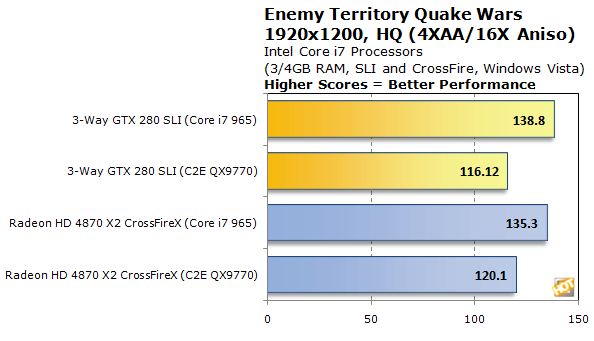  Both Enemy Territory Quake Wars and Unreal Tournament 3 showed a marked performance improvement when running on the Core i7 platform with either 3-Way GeForce GTX 280 SLI or a Radeon HD 4870 X2 CrossFireX configuration. As we stated on the previous page, however, although both graphics configurations were faster overall, expect even more performance with future driver releases. |
| Total System Power Consumption | ||||
We'd like to cover a few final data points before bringing this article to a close. Throughout all of our benchmarking and testing, we monitored how much power our test systems consumed using a power meter. Our goal was to give you all an idea as to how much power each configuration used while idling and while under a heavy workload. Please keep in mind that we were testing total system power consumption at the outlet here, not just the power being drawn by the processors alone.
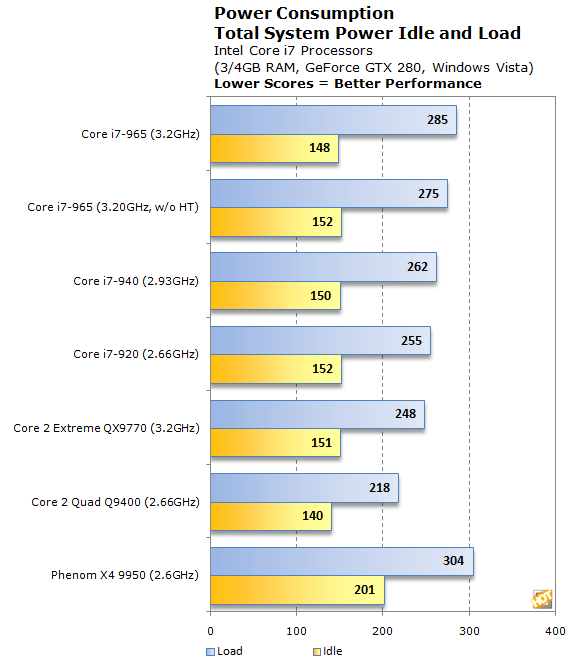 In terms of idle power consumption, the new Core i7 processors are right in line with their Yorkfield-based Core 2 predecessors; only a few watts separates the different platforms. Under load, however, the Core i7-based systems consumed markedly more power. The 3.2GHz Core i7 Extreme 965, for example, consumed 37 more watts than the similarly clocked Core 2 Extreme QX9770 while under a heavy workload. Please keep in mind though, the Core i7 performed at a much higher level than the QX9770 in the majority of our tests. So, while peak power consumption may be somewhat higher, the Core i7 platform is just as, if not more, power efficient than the Core 2. |
| Our Summary and Conclusion |
| Performance Summary: We have a number of different things to consider in this summary--the performance of the Core i7 as it compares to the Core 2 and Phenom, the performance of the Core i7 with and without Hyper-Threading enabled, and the performance of the three X58-based motherboards we tested. Thankfully, it's rather easy to summarize the Core i7 processor's performance. In the majority of the benchmarks we ran, the new Core i7 processors outperformed the fastest Core 2 Extreme, the 3.2GHz QX9770. Clock for clock, the Core i7 is markedly faster than the Core 2, which allowed the 2.66GHz Core i7 920 to outperform the 3.2GHz QX9770 on a number of occasions, and the overall the Core i7 Extreme 965 / X58 combo put up the best performance we have seen from a desktop PC platform to date. At no time did the Phenom X4 9950 threaten to overtake the similarly clocked Core i7 920 and the higher clocked 940 and Core i7 Extreme 965 were simply in another league. Comparing the Core i7 Extreme 965's performance with an without Hyper-Threading enabled yielded some interesting results. In the more heavily multi-threaded optimized benchmarks and applications, enabling HT on the Core i7 processor resulted in increased performance across the board. In a few of PCMark Vantage's test suites and in couple of the low-resolution gaming benchmarks, however, disabling HT resulted in increased performance. Unlike the day of the Pentium though, there aren't huge performance swings with HT enabled or disabled, so in our estimation it is fine to leave it enabled at all times. Especially as more and more multi-threaded applications hit the scene. Somewhat surprisingly, the three motherboards we tested put up measurably different benchmark scores. We suspect the relatively immaturity of the platform will account for the differences and that in time, most X58-based motherboards will offer similar performance. When AMD brought the memory controller onto the Athlon 64's die, once the platform matured, virtually all motherboards for the platform performed at similar levels. The same thing will probably ring true for the Core i7. For now though, the ASUS P6T Deluxe we tested offered the best overall performance, followed by the Gigabyte GA-EX58 Extreme, and then the Intel DX58SO. The performance deltas separating the three motherboards were relatively small, however, except for those produced in the low resolution in-game tests. The one drawback to the Core i7 platform, if you can really call it a drawback, is that the upgrade path from a Core 2 is somewhat difficult. Even if you've got a fast Core 2 processor and some DDR3 RAM, users will likely need to purchase at least one more stick of RAM to take full advantage of the platform's performance and a new motherboard and cooler will be required as well. If you're building a brand new rig, purchasing these items is to be expect, but if you're upgrading piecemeal, we can see some enthusiasts being put off a bit. When the new Core i7 processors arrive sometime later this month, pricing for the flagship Core i7 Extreme 965 will be set at $999, the Core i7 940 at $562, and the Core i7 920 at $284. Expect enthusiast-class X58 based motherboards to sell for around $300 give or take a few dollars depending on the number of features. Considering what we've seen of the Core i7's performance so far, what this means for Core 2 pricing remains to be seen, but we suspect some price cuts are in order. Ultimately, we can't help but be impressed by the new Core i7 processors. The performance, power profile, and overclockability are all very good even at this early stage. Intel clearly has another strong product in their line-up that will undoubtedly appeal to PC enthusiasts and multimedia professionals alike. |




No comments:
Post a Comment
thanx